
How Website Design Impacts Search Engine Rankings

Website design affects search visibility when it changes how people and search engines discover, understand and use a page. The impact is not a simple equation in which a more attractive site automatically ranks higher. Design choices shape architecture, links, content, mobile access, page performance, image handling, metadata and the safety of future updates.
Wix Solutions treats design and SEO as connected disciplines. The aim is to create pages that serve a clear search need, expose useful information in a crawlable form, work across devices and remain manageable as the business grows.
Website design influences search through systems, not decoration
Search engines need to find a URL, access its content, understand its subject and decide whether it is useful for a query. Visitors need to recognise relevance, read comfortably, compare information and complete a task. Good website design supports both journeys with clear structure and dependable interaction.
It is important to avoid oversimplified claims. Google says there is no single page-experience signal and that relevant content can still rank when the experience is imperfect. Core Web Vitals are used by ranking systems, but good scores do not guarantee top positions. The practical goal is an overall experience that is helpful, secure, mobile-ready and free from avoidable disruption.
Google’s current explanation is available in Understanding page experience in Google Search results. Wix Solutions uses this as a design and quality framework, not as a promise of ranking gains.

1. Information architecture determines what can be discovered
A coherent sitemap groups related topics and gives important pages a clear place in the hierarchy. Navigation and contextual internal links help visitors move from broad information to specific services, products or locations. They also help search engines discover relationships between pages.
Use real, crawlable links with descriptive anchor text. Avoid making essential destinations available only through a search box, filter state or visual interaction that produces no stable URL. Important content should not depend on someone knowing the exact route in advance.
Map priority audiences, tasks and search themes before designing the navigation.
Give each useful page a distinct purpose rather than publishing many near-duplicates.
Link from relevant hubs to detailed pages and back to useful parent or related content.
Keep URL patterns readable and stable as the site grows.
Include breadcrumbs where they genuinely help people understand location and hierarchy.
2. Content design makes relevance understandable
A page needs more than keywords. It should answer the question behind the search, show first-hand or verifiable evidence where appropriate and make the answer easy to find. Headings, summaries, lists, comparisons, images and calls to action should create a logical reading path.
Google’s people-first guidance encourages site owners to create content for an existing or intended audience, demonstrate experience and leave readers feeling they have learned enough to achieve their goal. Design supports that aim when the main content is visually prominent and supporting evidence appears where it is needed.
Review Google’s Creating helpful, reliable, people-first content before deciding how much copy, proof or supporting media a page requires.
3. Responsive design protects mobile content parity
A responsive website should provide the same meaningful content and functions across devices. Do not remove essential explanations, links or structured information from mobile merely to make a page shorter. Reorder and simplify the presentation while preserving the substance.
Check tap targets, menus, accordions, filters, forms and sticky elements on real screens. Intrusive overlays or interstitials can obscure the main content. A mobile layout that technically fits the viewport may still be difficult to use if actions compete, text is cramped or filters reset unexpectedly.
4. Performance is shaped by visual and technical decisions
Large hero media, video, third-party scripts, animation and complex components all consume time and processing. Reserve image space to reduce layout movement, choose appropriate dimensions, compress assets and avoid loading features that do not serve the page’s main task.
Measure field data as well as laboratory tests. Real users experience different devices, connections and sessions. Prioritise the templates and pages that matter most, then investigate the element or script responsible rather than chasing a perfect score without context.
5. Image design affects access, context and discovery
Use high-quality images near relevant text, provide descriptive file and alternative text where appropriate, and avoid embedding essential wording inside graphics. The alternative text should describe the image’s useful meaning in context, not repeat a keyword list.
Responsive images, sensible dimensions and lazy loading below the initial viewport can reduce unnecessary transfer. Product, location and case-study images need captions or surrounding copy that explains what they show. Decorative assets can use empty alternative text so assistive technology is not forced to announce them.
Google’s official Image SEO best practices explains image quality, placement, alternative text and technical discovery.
6. JavaScript and interaction must preserve crawlable content
Interactive design can improve product filtering, calculators, booking and personalisation, but important content and links should remain accessible to search engines. Google processes JavaScript, yet JavaScript applications still need indexable URLs, meaningful titles, status codes and link structures.
Test rendered pages, not only source templates. Ensure error pages return appropriate status, canonical choices match the intended URL and lazy-loaded content appears without requiring an action Google cannot perform. When a component creates a shareable state, decide whether that state deserves its own URL.
For implementation detail, consult Google’s JavaScript SEO basics.
7. Structured data should describe visible reality
Structured data can help search systems understand entities such as organisations, products, articles, events or local businesses. It must match the visible page and follow the requirements for the relevant feature. Adding markup does not guarantee a rich result.
Treat schema as part of the content model. Product price, availability, event dates, author details and policies need reliable owners and update paths. A technically valid script that contradicts the page creates a governance problem, not an SEO advantage.
8. Redesigns need URL and content governance
A visual redesign can damage search performance if it removes useful content, changes URLs without redirects, weakens internal links or accidentally blocks indexing. Start with a content and URL inventory. Decide which pages stay, merge, improve or retire, and map every changed URL to the most relevant destination.
Keep a record of titles, descriptions, headings, structured data, canonical settings and media. Test redirects, sitemap output, navigation and key templates before launch. After publication, monitor Search Console coverage, queries, clicks and Core Web Vitals alongside business conversions.
This migration discipline is covered in more depth in Website Design Impacts Search Rankings.
Five illustrative cross-industry case studies
The following cases are fictional teaching scenarios. Names, people, data and results shown in the visuals are illustrative; they are not client claims, ranking promises or guarantees.
Case study 1: Educational toy store — turn catalogue structure into search paths
An educational toy retailer organised products by supplier, while parents searched by age, skill and play type. The redesign introduced stable category pages, useful filters, structured product information and buying guides that linked directly to relevant ranges.
Images were resized and described, product data remained consistent and the same categories supported navigation, internal links and structured data. SEO improvement came from a clearer catalogue and better answers—not from adding more keywords to generic product grids.

Case study 2: Wedding venue — preserve visibility during a redesign
A wedding venue wanted larger imagery and a premium visual system. The project also changed pages for ceremonies, receptions, accommodation and planning. A URL inventory protected established search paths, while redirects connected retired addresses to the most relevant new pages.
Photography was optimised and paired with text about capacity, location, inclusions and availability. The launch plan checked mobile performance, metadata, internal links and sitemap output. The design modernised the brand without discarding the information searchers already valued.

Case study 3: Construction firm — build authority around capabilities and evidence
A construction firm had one broad Services page and a portfolio that could not be filtered. Prospects and search engines had little context about sectors, project types or locations. The redesign created capability pages supported by relevant projects, accreditations and a clearer enquiry route.
Internal links connected sector hubs, projects and service detail. The visual hierarchy helped readers scan evidence without hiding it inside carousels. Search landing pages and sales qualification became parts of the same architecture.

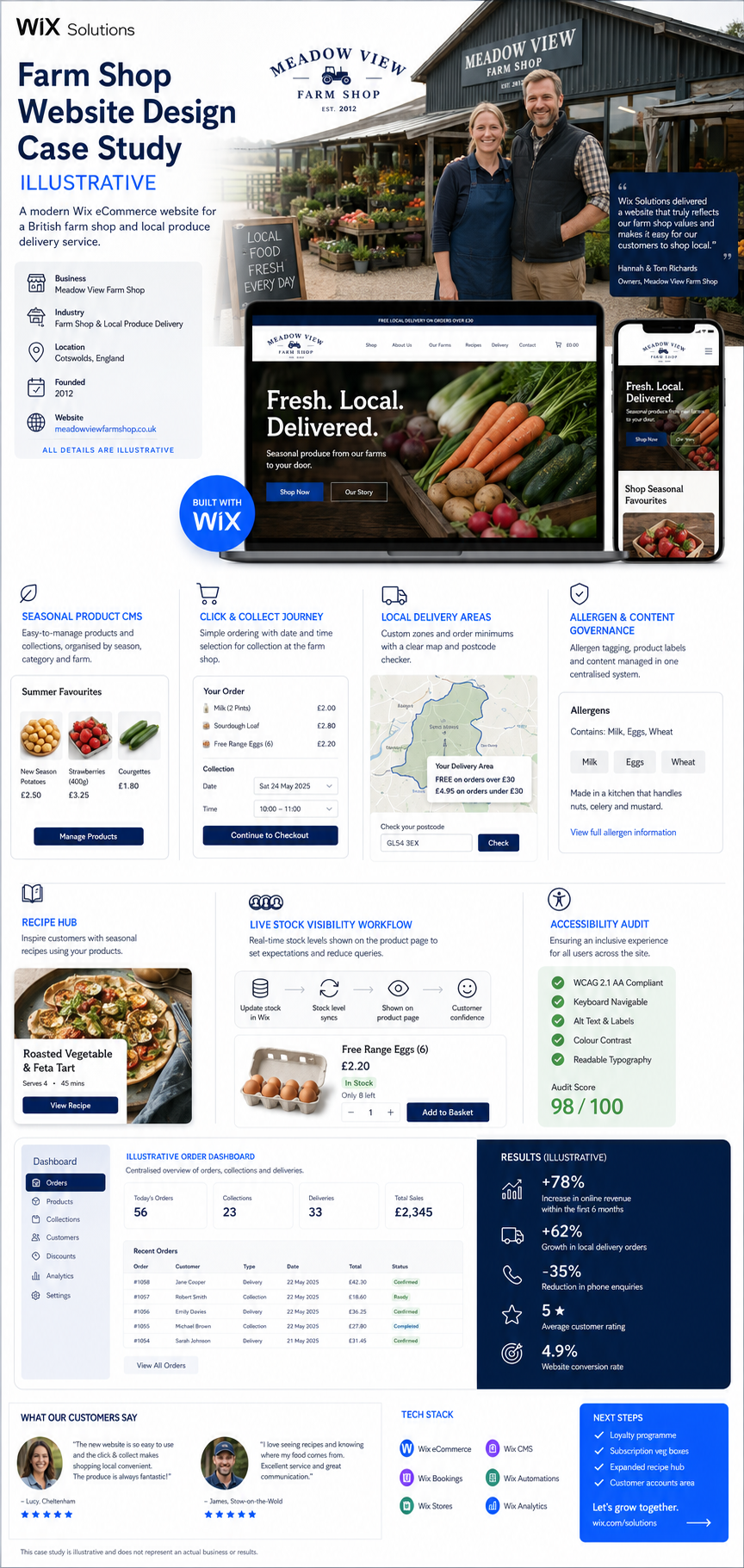
Case study 4: Farm shop — combine local, product and recipe content
A farm shop needed to surface seasonal products, collection slots, local delivery areas, allergens and recipes. Separate promotional pages had created repeated copy and inconsistent details. The redesigned CMS gave each product and recipe a structured record, while local delivery information had a stable, linked page.
Recipe content linked naturally to ingredients and seasonal collections; product pages showed stock and fulfilment clearly. The architecture helped visitors complete a task and reduced duplication that had made updates unreliable.
Case study 5: Independent optician — connect local search to a useful journey
An optician relied on a location page and social posts but had limited service detail. The redesign created clear pages for eye examinations, contact lenses and eyewear, supported by practitioner information, reviews, opening details and a mobile booking journey.
Local landing content answered practical questions rather than repeating the town name. Social content linked to the most relevant page, and appointment confirmations matched the promise made in search. The website supported visibility by being a better destination for the query.

A Wix Solutions design and SEO checklist
Give every indexable page a distinct purpose and useful primary content.
Use a logical sitemap, descriptive navigation and crawlable contextual links.
Maintain meaningful content and functionality on mobile.
Optimise images, video, fonts and third-party scripts for real-world performance.
Write clear titles, headings, summaries and calls to action for people first.
Use structured data only when it matches visible, maintained information.
Keep canonical, index and redirect settings intentional.
Test rendered pages, forms, filters, error states and status codes.
Map URLs and content before any redesign or domain change.
Monitor Search Console, analytics and business outcomes after launch.
For the wider design foundation, read The Basics of Modern Website Design for Businesses. A closely related perspective is available in How Good Website Design Impacts Search Rankings.
Frequently asked questions
Does good website design guarantee higher search rankings?
No. Search rankings depend on relevance, content quality, competition, authority, technical accessibility and many other systems. Good design removes avoidable barriers and helps people use the content, but it cannot guarantee a particular position.
Are Core Web Vitals ranking factors?
Google states that Core Web Vitals are used by its ranking systems, while also explaining that good scores do not guarantee top rankings and that overall page experience includes more than one or two metrics. Improve them for users and monitor real-world data.
Can a website redesign reduce organic traffic?
Yes, if useful content is removed, URLs change without redirects, internal links break, metadata is lost or crawling is blocked. A redesign should include a content inventory, URL map, redirect plan, technical checks and post-launch Search Console monitoring.
Does Wix support technical SEO?
Wix supports editable SEO settings, structured data, redirects, sitemaps, responsive pages and integrations with Google Search Console. Results still depend on site architecture, content quality, media choices, settings and ongoing maintenance.
Conclusion
Website design supports search engine rankings when it creates a clear, crawlable, helpful and dependable experience. Architecture, content, mobile parity, performance, images, interaction and migration planning all contribute. None works as a shortcut, and no redesign can guarantee a position.
Wix Solutions combines design, content and technical SEO so improvements serve both search discovery and the customer decision. The right question is not whether design or SEO comes first; it is whether the complete page helps the right person and can be understood, maintained and measured.
Bibliography
Enge, Eric; Spencer, Stephan; Stricchiola, Jessie C. The Art of SEO: Mastering Search Engine Optimization. 4th edition.
Schwartz, Eli. Product-Led SEO: The Why Behind Building Your Organic Growth Strategy. 1st edition.
Rosenfeld, Louis; Morville, Peter; Arango, Jorge. Information Architecture: For the Web and Beyond. 4th edition.
Hane, Carrie; Atherton, Mike. Designing Connected Content: Plan and Model Digital Products for Today and Tomorrow. 1st edition.
Krug, Steve. Don't Make Me Think, Revisited: A Common Sense Approach to Web Usability. 3rd edition.
Wagner, Jeremy. Web Performance in Action: Building Faster Web Pages. 1st edition.


