
Wix Websites: Design a Site Your Team Can Operate

A Wix site can be easy to edit and still be difficult to operate. Pages accumulate, buttons acquire different labels, service facts appear in several places and one confident editor becomes the only person who knows how the whole thing works. The platform is flexible; the operating model decides whether that flexibility becomes speed or disorder.
Wix Websites work best when design, content, data and ownership form one system. This practical guide explains how to plan that system so a team can publish confidently, protect quality and improve the experience without rebuilding it each quarter.
Wix Websites begin with an operating model
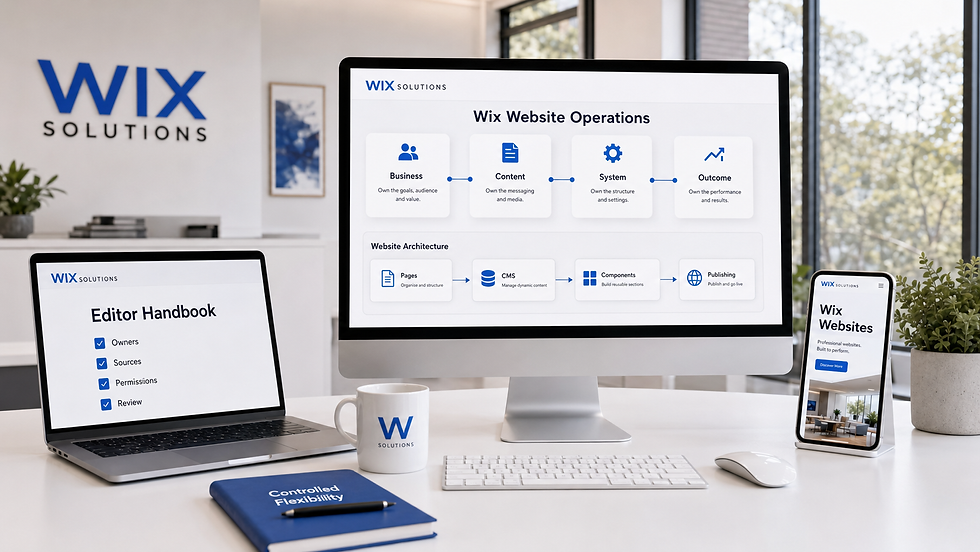
The first design decision is not a colour or template. It is the relationship between the website and the organisation behind it. Who owns service facts? Which team receives enquiries? Which information changes frequently? Which records repeat? What must be reviewed before publication? What evidence will show that the site is helping?
A maintainable Wix website gives the right person controlled freedom to make the right kind of change.
Wix Websites need one source of truth
When the same service description is typed independently on five pages, every update creates five opportunities for contradiction. A source-of-truth plan identifies the authoritative location for each reusable fact: name, price, location, eligibility, contact route, image, testimonial permission, case-study status or policy date.
Some facts belong directly on a page; repeated structured records may belong in a collection. The choice should follow content behaviour, not a desire to use every available tool.
Define four kinds of ownership
Business owner. Decides whether the promise, scope and commercial conditions remain accurate.
Content owner. Maintains language, evidence, dates, links and editorial standards.
System owner. Protects templates, components, collections, permissions, integrations and technical settings.
Outcome owner. Reviews enquiries, purchases, service contacts and analytics so the website learns from operations.
One person may hold several roles in a small business, but naming the roles still matters. A task without an owner becomes a future inconsistency.
Map the architecture before opening the editor
Inventory content by job, risk and change rate
Create a simple inventory of existing and planned content. For each item, record its audience, job, owner, source, risk, change frequency and relationships. A homepage promise, a legal condition and a portfolio image should not follow the same approval route.
Use the inventory to distinguish navigation labels from internal terminology. The public structure should reflect customer language, supported by a connected website design glossary definition and focused service pages rather than a menu that mirrors departments.
Choose static pages for singular narratives
A static page is usually appropriate when the content has a unique purpose and composition: the homepage, a contact page, a campaign narrative or a detailed explanation of one service. The page can still use reusable sections, but its information is not one item in a repeating dataset.
Choose dynamic pages for repeated records
Wix explains that dynamic pages display content from a CMS collection through a consistent design. They suit repeated records such as services, locations, team profiles, projects or glossary entries when those records share a stable structure.
A dynamic design is not permission to make every record identical. The collection should allow meaningful variation—such as challenge, evidence, location detail, outcome or accessibility information—without inviting editors to paste whole page layouts into text fields.
Model a collection before creating it
Write three representative records, including the simplest and most complex example.
Mark the fields that repeat and the parts that genuinely vary.
Choose field types that match the information rather than storing everything as formatted text.
Name fields for editors, not developers or database shorthand.
Define which fields are required, who supplies them and what counts as acceptable evidence.
Plan listing, item and related-content relationships before importing the full dataset.
Testing with real variation exposes a weak model early. If one record requires twenty exceptions, either the model is wrong or the item belongs to a different content type.
Build a design system your content can survive
Start with realistic words and images
Empty boxes make almost every layout look balanced. Replace them with a long heading, short heading, missing image, detailed service description, translated phrase, error message and narrow mobile screen. Components should accommodate meaningful variation without losing hierarchy.
If imagery carries evidence, define its purpose, crop behaviour, source, permission and alternative text. The Wix image settings guide supports practical media configuration, while Image Editing and Website Visuals can help create a consistent visual library.
Create component roles, not decorative names
Names such as “blue strip” or “nice cards” describe appearance but not function. Prefer roles such as service summary, evidence panel, next-step block, warning, testimonial, comparison or related resource. A functional name helps the editor choose the right component when colours later change.
Purpose. What user question or decision does the component support?
Required content. Which elements must be present for it to remain meaningful?
Optional variation. What can change without creating a new component?
Accessibility behaviour. What heading, reading, focus and alternative-text rules apply?
Editorial limit. What should never be placed here?
Design responsive behaviour deliberately
Wix Studio supports design across breakpoints and smaller-breakpoint overrides. Treat those controls as implementation tools, not a substitute for priority decisions. Decide what should reflow, stack, scale, simplify or remain visible before adjusting each screen.
Test touch targets, reading order, navigation, forms, galleries, long words and content entered by real editors. A page can look correct at three preview widths yet fail between them or when text size increases.
Use accessibility tools as part of review
The Wix Accessibility Wizard can identify and guide fixes for potential issues, including manual tasks. A scan is a valuable checkpoint, but human review still needs keyboard operation, meaningful headings, clear labels, error recovery, contrast, alternatives and real content context.
Accessibility should be included in the definition of done. Our Wix Website Design service treats structure, content and interaction as connected parts of the experience.
Connect content to business operations
Design forms backwards from the response
Begin with the person who receives the submission. What information allows a useful response? Which details are sensitive? What can be asked later? What confirmation does the visitor need? How quickly can the team respond, and what should happen when the normal owner is unavailable?
Every field adds effort and data responsibility. Ask only what supports the immediate process. Labels should remain visible, errors should explain recovery and the confirmation should state what happens next rather than merely saying “submitted”.
Create routes for different intentions
A visitor who needs urgent support, a prospective customer comparing services and an existing customer seeking documentation should not be pushed through one generic contact button. The information architecture can create distinct routes while protecting a consistent tone.
Keep the direct contact page available, but link contextual actions to the destination that can actually fulfil them. Service discovery may lead to the services listing page; evidence may lead to a relevant case study; a technical task may lead to Wix instructions.
Plan search settings with the content model
SEO is easier when page purpose, URL, title, heading and internal relationships are decided together. A repeated content type should include fields and editorial rules for unique titles, descriptions, images and useful page content. Publishing hundreds of thin variants does not become a strategy simply because the CMS can generate them.
Use the Wix SEO basics guide for essential settings and the technical SEO glossary when a concept needs clarification.
Four illustrative Wix Websites case studies
These composite cases are illustrative operating scenarios, not claims about named Wix Solutions clients.
Case study 1: a multi-location service controls local facts
A service company created a separate static page whenever a new location opened. Opening hours, service eligibility and contact details were copied from an older page, so small differences became difficult to track.
The redesign created a locations collection with accountable owners and defined fields for address, availability, accessibility information, service differences and local evidence. A dynamic listing supported discovery while each item page retained genuinely local content.
The team reviewed fact corrections, publishing time, local enquiries and unsuitable contacts. The value came from controlled variation: consistent structure without pretending every location was the same.
Case study 2: a creative studio turns projects into evidence
A studio portfolio was visually impressive but difficult to update. Project pages had different structures, images lacked context and prospects could not tell which work related to their sector or problem.
A case-study model separated client context, constraint, approach, deliverable, evidence, image permission and related service. The listing allowed useful filtering while item pages kept enough narrative space for the work to remain distinctive.
The publishing checklist required source approval and a next-step route. For an example of structured evidence, see the website designer agency case study.
Case study 3: a membership organisation protects editorial consistency
Several volunteers could update a membership site, but each used different headings, button labels and image styles. Important policy changes were occasionally published on one page but not another.
The team reduced open-ended editing, documented component roles and assigned policy facts to a single maintained source. Reusable page patterns supported news, resources and events, while high-risk information required named approval.
Review focused on outdated content, accessibility findings, volunteer confidence and support questions. The site became easier to contribute to because freedom had clear, understandable boundaries.
Case study 4: a retailer coordinates campaigns and catalogue
A retailer built beautiful seasonal landing pages that contradicted stock, delivery and product information elsewhere. Campaign owners worked quickly, but the customer experienced several versions of the same promise.
The operating model separated campaign narrative from authoritative product facts and established approved components for delivery, returns and collection links. The Wix Store and E-commerce Setup service provided a route to align catalogue, purchase and operational decisions.
The team evaluated correction frequency, campaign build time, product questions and post-purchase issues. Design governance improved speed because repeated decisions no longer started from zero.
How to build Wix Websites as maintainable systems
Follow this twelve-step operating sequence
Define the job. Name the primary audiences, situations, tasks and business responsibilities.
Assign owners. Identify business, content, system and outcome accountability.
Inventory content. Record purpose, source, risk, change rate and relationships.
Map architecture. Design navigation and page relationships using customer language.
Select content types. Separate singular pages from repeatable structured records.
Model collections. Test fields and relationships with realistic variation.
Design components. Create reusable roles with content and accessibility rules.
Build responsively. Test priorities, reflow and interaction across widths and inputs.
Connect operations. Align forms, stores, bookings or member routes with the responsible team.
Configure discovery. Set URLs, metadata, internal links and indexing intentions.
Verify and publish. Review content, permissions, accessibility, performance, forms and analytics.
Govern and learn. Schedule reviews, log changes and use operational evidence to improve.
Do not wait until the last step to think about governance. Every earlier decision should leave an owner, rule or record that makes later operation safer.
Create a one-page editor handbook
Who may edit which content types.
Which facts are authoritative and where they live.
How headings, buttons, images, links and alternative text are written.
Which components are approved for each content job.
What must be checked on mobile and with a keyboard.
Which changes need business, legal or technical approval.
How a correction, rollback or urgent notice is handled.
Which outcomes are reviewed each month and by whom.
A useful handbook is short enough to consult during publication. Link to deeper instructions only where the editor needs them.
Run a monthly website operations review
Bring together the people who see different evidence: editor, service owner, sales or support representative and system owner. Review content corrections, failed journeys, search terms, form quality, accessibility issues, performance, operational questions and upcoming changes.
Choose one or two improvements with named owners and evaluation dates. The meeting is not a report on page views; it is a mechanism for keeping the website aligned with the organisation.
Wix Websites final readiness checklist
Every important page has a stated purpose and owner.
Navigation reflects customer language and priority tasks.
Repeated records use a tested content model where appropriate.
Components have functional roles and content rules.
Responsive behaviour has been tested with realistic variation.
Accessibility review includes automated guidance and manual checks.
Forms connect to an accountable response process.
URLs, metadata and internal links match page purpose.
Editors have documented permissions and publishing checks.
Monthly evidence can change content, design or operations.
For help turning an existing Wix site into a maintainable system, contact Wix Solutions. Related reading: Web Design Investment: What Quality Actually Buys and Successful Website: Make Every Essential Component Work Together.
Questions and answers
Should Wix Websites use static or dynamic pages?
Use static pages for singular narratives and dynamic pages for repeated structured records that share a stable design. The decision should follow content behaviour, ownership and variation—not a preference for one tool.
How many people should edit a Wix website?
As many as the operating model can support safely. Give each contributor the access, content types and instructions required for their role, while reserving high-risk settings and authoritative facts for accountable owners.
Does a CMS automatically keep content consistent?
No. A CMS enforces only the structure you design. Weak fields, unclear sources and missing ownership can produce consistent-looking but unreliable pages. Model representative records and define editorial rules before scaling.
Is the Accessibility Wizard enough to make a site accessible?
It is a valuable scanning and guidance tool, but accessibility also requires manual judgement and testing. Review keyboard use, headings, labels, alternatives, errors, contrast, reading order and real tasks.
How often should a Wix site be reviewed?
Review high-risk and frequently changing facts according to their own schedule, and hold a broader operational review at least monthly. Use evidence and upcoming business change to set priorities.
Can a Wix website scale with a growing business?
It can support substantial growth when architecture, content models, components, permissions, integrations and governance are designed deliberately. Scaling disorganised pages only increases inconsistency.
Conclusion: make flexibility governable
Wix Websites become valuable operating systems when teams can change them without losing accuracy, accessibility or coherence. Begin with ownership, model the content, design reusable roles, connect actions to real operations and review evidence after launch.
The best editing experience is not unlimited choice. It is clear, safe control over the decisions the editor is qualified to make.
Bibliography
Boag, Paul. Digital Adaptation. 1st edition. 2014.
Halvorson, Kristina, and Melissa Rach. Content Strategy for the Web. 2nd edition. 2012.
Rockley, Ann, and Charles Cooper. Managing Enterprise Content. 2nd edition. 2012.
Kalbach, James. Mapping Experiences. 2nd edition. 2020.
Johnson, Jeff. Designing with the Mind in Mind. 3rd edition. 2020.
Krug, Steve. Don’t Make Me Think, Revisited. 3rd edition. 2014.


