Fareham Website Maintenance: A Practical Operations Guide

Updated: Sep 25, 2023
Fareham website maintenance is the operating work that keeps a live site accurate, usable and connected to the business behind it. It includes content, permissions, forms, apps, domains, search settings, accessibility, performance and evidence that important customer journeys still work.
That matters across Fareham's varied economy. Council information describes business concentrations around the M27 and specialist activity in engineering, aerospace, aviation and marine industries at Daedalus, alongside town-centre, service and retail businesses. Their websites have different risks, but each needs clear ownership when services, staff, products or systems change.

This guide explains how to build a proportionate maintenance system for a Wix website. It includes four illustrative business scenarios, a responsible AI section and practical schedules. Maintenance reduces avoidable risk; it cannot guarantee uninterrupted service, rankings, enquiries or revenue.
Build Fareham Website Maintenance as an Operating System
Start with the website's business jobs. It may qualify technical enquiries, sell products, take bookings, publish controlled documents or route urgent service requests. Name the customer task, operational owner, website owner, systems involved, evidence of success and the consequence if it fails.
Separate platform responsibilities from business responsibilities. Wix manages much of the hosted infrastructure and platform release process. The site owner still controls account security, contributor access, subscriptions, domain renewal, content accuracy, apps, payment or booking settings, privacy choices, integrations and customer response.
Audit Fareham Website Maintenance Risk
Inventory pages, CMS collections, media, forms, automations, apps, payment providers, booking tools, domains, email routes, analytics, consent tools, external documents and search profiles. Record an owner, purpose, data handled, renewal or review date, dependency and safe test method.
The guide to signs it is time to update a website can help distinguish routine upkeep from structural problems. Slow journeys, inconsistent mobile layouts, outdated services and difficult editing may indicate a focused refresh or a wider rebuild.
Create a Maintenance Register
Record critical assets and owners
Use a simple register for pages, integrations and recurring tasks. Include the business owner, technical owner, content approver, last review, next review, test evidence and escalation contact. Mark high-risk items such as payment, booking, lead delivery, regulated claims and time-sensitive technical documents.
A register should help someone act, not become an administrative archive. Link to the relevant dashboard, procedure or evidence without copying passwords or secret keys into the document. Review ownership when staff, suppliers or agencies change.
Use change triggers as well as dates
Monthly or quarterly reviews are useful, but events often matter more. A new service, product, qualification, price, team member, location, supplier, privacy process or campaign should trigger website checks. So should a platform notification, integration change, failed form, customer complaint or unusual analytics pattern.
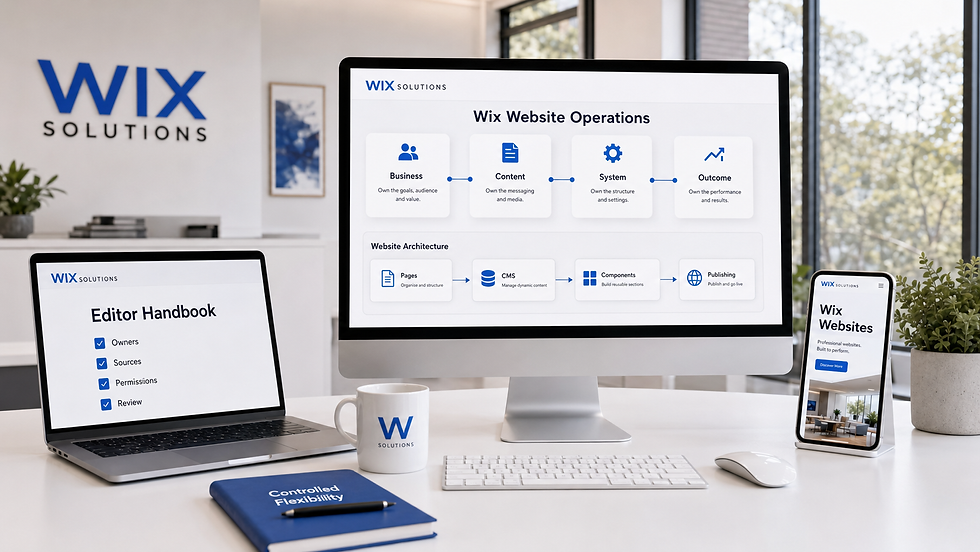
A site planned around Wix websites that teams can operate makes maintenance easier through reusable components, structured content and a clear editor handbook. Governance should be designed into the website rather than left to individual memory.
Maintain Content and Evidence
Review business-critical facts
Check services, coverage, opening information, prices, lead times, qualifications, policies, staff biographies, case material and contact details. Attach important claims to an approved source and expiry or review date. Remove or qualify evidence that is no longer current.
For engineering or specialist suppliers, control technical documents carefully. Publish approved versions, state revisions where useful and remove superseded files from navigation and search. Do not expose restricted specifications, customer identities, site information or confidential project detail.
Keep repeated facts consistent
A phone number or delivery rule may appear on several pages, in forms, structured data and automated emails. Identify the source of truth and every dependent location. Reusable sections and CMS content can reduce drift, but they still require an owner and test after changes.
Do not create thin location pages for every Fareham neighbourhood or nearby settlement. Maintain a clear, factual service boundary. Only create a distinct area page when customer needs, delivery, evidence or operations genuinely differ.
Protect Accounts, Domains and Permissions
Apply least-privilege access
Give contributors the minimum role needed for their work. Use named accounts, strong authentication and a prompt leaver process. Review owners, administrators, editors, billing contacts and connected apps regularly. Avoid shared credentials and remove unused access rather than assuming it will expire.
Document who controls the Wix account, domain registrar, business email, payment provider and analytics properties. Keep renewal contacts and payment methods current. A functioning website can still become unavailable or unmanageable if the organisation loses control of a domain or primary account.
Review apps and integrations
List each connected app, the data it receives, permissions granted, business purpose, owner and exit plan. Remove unused integrations and review vendor notices. Test changes in a controlled way, especially where a form, booking, payment or CRM flow depends on several services.
Test Forms, Automations and Handoffs
Submit important forms using realistic but non-sensitive test data. Confirm validation, consent wording, delivery, routing, acknowledgements and follow-up ownership. Check that valid entries are preserved after an error and that confirmation does not imply an accepted booking, order or project before the business confirms it.
Test from mobile and desktop, and include keyboard and accessibility checks. Verify what happens when an inbox is full, a recipient leaves or an integration is delayed. Keep an alternative contact route where the risk justifies it, and make escalation visible to the people responsible.
The website solutions guide explains how content, forms, integrations and ownership should fit the operating model. Maintenance is more reliable when the public journey and internal hand-off are designed together.
Maintain Products, Bookings and CMS Data
Check catalogue and availability rules
Review product names, images, variants, prices, stock behaviour, delivery, collection, returns and tax or payment settings appropriate to the business. For bookings, check services, staff, locations, durations, availability, reminders and cancellation rules. Test the complete customer journey rather than viewing settings in isolation.
CMS collections need field definitions, ownership and validation. Remove orphaned records and broken references carefully. Confirm that filters, dynamic pages and permissions still behave as intended after schema or content changes.
Plan recoverability realistically
Understand the version history and recovery options available for the Wix site and each connected system. Keep approved copies of critical content, media, policies and configuration records where appropriate. Export business data only through authorised methods and protect it according to its sensitivity.
Do not call an untested copy a backup. Document what can be restored, by whom and within what practical period. A site version may not recreate every transaction, email, external integration or third-party record, so continuity planning must cover the whole journey.
Monitor Performance and Accessibility
Review page speed, image weight, layout movement, mobile behaviour and third-party scripts on important templates. Large media and accumulated apps can add friction. Optimise assets, remove unused elements and test representative devices before and after substantial changes.
Check heading order, contrast, keyboard focus, labels, errors, text alternatives, zoom and reflow. Automated tools identify only some barriers. Manual journey testing and representative feedback are necessary for useful evidence. New content and components should follow the same accessible patterns as the launch site.
Protect Search Equity During Changes
Review page titles, descriptions, headings, indexability, canonical choices, structured data, internal links and sitemap coverage. When a useful URL changes, map it to the most relevant live destination and verify the redirect. Avoid redirect chains and do not send every retired page to the homepage.
Search settings must match visible content and the real organisation. Remove outdated local or service schema rather than leaving unsupported claims in code. Check Google Search Console for crawling, indexing and enhancement issues after releases, while recognising that no maintenance action guarantees a ranking.
Use Analytics as a Maintenance Signal
Define a small set of operational measures: successful form delivery, booking completion, payment errors, broken journeys, page speed, repeated site searches, unsuitable enquiries and support questions. Review trends with release notes so the team can investigate changes rather than reacting to isolated numbers.
Use website analytics alongside direct tests and staff evidence. A traffic fall may reflect seasonality or campaigns; a stable chart does not prove that forms, integrations or content are correct.
Prepare for Incidents
Write a short response procedure
Define how staff report an issue, who assesses severity, who can change the site and who communicates with customers. Include contact details for account, domain, payment and integration owners. Prioritise data exposure, payment or booking failure, unavailable critical content and widespread form loss.
Preserve evidence before making broad changes. Record timing, affected journey, recent releases and actions taken. Use a temporary notice only when accurate and necessary. After recovery, confirm the customer journey, notify appropriate stakeholders and record improvements to prevent recurrence.
Four Illustrative Fareham Maintenance Plans
Practical Example 1: An engineering supplier
A supplier gives technical pages, certificates and enquiry routing named owners. Monthly tests confirm secure lead delivery; quarterly reviews check approved documents and permissions. Restricted specifications are never used as public content. Release notes connect website changes with sales and support feedback.
Practical Example 2: A hospitality venue
A venue reviews menus, opening information, access details and booking rules whenever operations change. Staff test mobile reservations and confirmation emails before seasonal campaigns. Expired event pages redirect appropriately, and recurring guest questions become evidence for content updates.
Practical Example 3: A service-area trades business
A trades firm maintains accurate coverage, service limits and response expectations. Form delivery is tested after staff or inbox changes, and urgent wording never promises availability the rota cannot support. Qualifications and insurance statements have review dates and responsible approvers.
Practical Example 4: An online retailer
A retailer schedules catalogue, stock, delivery, returns, payment and support checks. Product owners approve material and origin claims. The team tests checkout on representative devices, reviews failed searches and support contacts, and documents how important product and order data can be recovered.
Responsible AI for Website Maintenance
AI tools can organise a maintenance register, group anonymised support themes, draft test cases and summarise approved release notes. They can flag inconsistent terminology, broken-content patterns or unusual analytics for investigation. These uses accelerate preparation; they do not confirm that a journey, claim or system is correct.
Do not upload credentials, secret keys, customer records, form submissions, payment data, contracts, technical files or incident evidence to an unapproved tool. Do not let AI publish outage notices, change permissions, alter live integrations or execute generated code without authorised review and safe testing.
A human owner must verify every change and its rollback or recovery implications. Generated schema, scripts, automations and accessibility code can create hidden failures. Keep audit evidence, copyright, privacy, security and customer promises under accountable human control.
Choose a Proportionate Schedule
Use frequent automated alerts where they are dependable, but keep human checks. High-risk forms and payments may need regular transaction tests; business facts may need monthly or quarterly review; permissions, renewals and recovery procedures may suit a quarterly or six-monthly cycle. Adjust frequency for volume, change and consequence.
A maintenance plan should state what is included, evidence produced, exclusions and escalation. It should evolve after incidents, staff changes and new integrations. Avoid activity for its own sake: every task should protect a customer journey, business obligation or measurable asset.
Choose Suitable Ongoing Support
A useful partner should ask about ownership, permissions, forms, apps, data, recovery and business response before proposing hours or tasks. They should distinguish maintenance from a redesign and avoid guarantees about uptime, security, search positions, enquiries or revenue.
Explore Wix Solutions' website and digital services to scope design, content, SEO and operational support around the current system. The right work follows from risk, change frequency and internal capability.
Conclusion
A maintained Fareham website is accurate, testable and owned. It connects content, permissions, forms, integrations, performance, search and incident response to real business operations. Start with critical customer journeys, record evidence and improve the system whenever the organisation changes.
If you want to create a practical Wix maintenance register or resolve recurring website issues, contact Wix Solutions with the priority journey, connected systems, known risks and current owners.