Complete Protein & Macro Intake Calculator

A protein and macro calculator can help an adult understand how food energy is divided between protein, carbohydrate and fat. It can also create a useful starting point for a conversation with a registered professional. It cannot diagnose a condition, detect nutritional deficiency or know whether a target is safe for a particular person.
This Wix Solutions guide focuses on how to design the calculator responsibly for a Wix website: which inputs to request, how to explain the estimate, what UK reference values can anchor the result, how to protect privacy and when the tool should stop and direct the user to professional support.
Calculator scope: useful estimate, not personal prescription
The safest first decision is the scope. This proposed calculator is for adults seeking general information. It should not be positioned as a treatment plan, a sports-performance prescription or a substitute for an assessment. The interface must say what the result means before asking for personal information.
The UK government’s dietary recommendations are population reference values. For adults aged 19–64, the published table gives 55.5 g of protein per day for males and 45.0 g for females, alongside reference energy and macronutrient figures. The same document states that individual energy requirements vary and that people with medical conditions seeking dietary advice should consult a GP or registered dietitian.
The underlying public-health context is available in the Government Dietary Recommendations and the NHS Eatwell Guide. These sources should remain visible near the results rather than being hidden in small print.

What the calculator should ask
Every field should earn its place. Fewer inputs reduce friction and privacy risk; better explanations improve accuracy. A general adult tool might ask for age band, body mass, height, activity pattern and the purpose of the estimate. If a calculation uses sex-specific reference data, explain why that input is requested and how it affects the method.
Age gate: confirm that the user is 18 or over before displaying adult calculations.
Body mass and height: accept metric units directly and provide clear conversion if imperial inputs are supported.
Activity: describe ordinary weekly movement and structured exercise with concrete examples rather than labels such as active or very active alone.
Goal: use neutral choices such as understand current intake, maintain weight or discuss a target with a professional.
Dietary pattern: optional and used only to tailor food examples, never to change a clinical requirement without professional review.
Consent and privacy: explain whether values are calculated locally, saved or shared before submission.
Avoid collecting names, email addresses or health details merely to reveal a result. Do not ask about diagnoses unless the tool has a clear, clinically governed purpose and the appropriate privacy controls. A general calculator can instead present an exclusion notice and direct users with special requirements to professional advice.
How a transparent macro estimate works
A responsible result begins with an energy estimate and shows that it is approximate. The NHS states that, as a broad guide, an average man needs around 2,500 kcal per day and an average woman around 2,000 kcal, while noting that needs vary with age, weight, height and exercise. The calculator should not present those averages as a personal entitlement or limit.
See the NHS explanation of understanding calories for the distinction between food energy, average guidance and individual variation.
After establishing the estimate, the tool can show how an editable allocation affects gram values. Protein and carbohydrate provide roughly 4 kcal per gram, while fat provides roughly 9 kcal per gram. If the calculator uses percentages, display the arithmetic: grams equal allocated calories divided by the energy value per gram. Never hide goal adjustments behind a single Generate button.
The output should contain three layers: a general UK reference anchor, the calculator’s estimate and an explanation of uncertainty. Use ranges where the evidence and context support them, but do not create a broad range merely to appear personalised. Rounding to practical whole grams is usually clearer than false precision.
Safety gates and professional escalation
Some users need more than a general tool. The calculator should stop or display a prominent professional-advice message for anyone who is pregnant or breastfeeding, under 18, frail, recovering from illness or surgery, living with kidney or liver disease, managing diabetes or another condition affected by diet, following a prescribed diet, experiencing unexplained weight change or concerned about an eating disorder.
Performance athletes and people with highly specialised training needs may also require assessment by a registered sports dietitian. The tool should not imply that more exercise automatically justifies a very high protein target. It should support informed questions, not encourage escalation by default.
Avoid red-and-green judgement labels for food or body goals. Use neutral language, provide a Reset option and do not celebrate lower energy intake or higher protein as universally better. The emotional effect of the interface is part of safety.
Five illustrative implementation case studies
The following cases are fictional design scenarios. Names, people, data and outcomes shown in the visuals are illustrative and do not represent clinical results or guarantees. Each industry demonstrates a different governance or user-experience lesson.
Case study 1: Fitness studio — education without prescription
A fitness studio wanted a member calculator to support introductory nutrition workshops. The first concept produced a single protein number from weight and training frequency, but it failed to explain the source, uncertainty or exclusions. Wix Solutions reframed the tool as an educational estimate.
The result page showed the method, the government reference anchor, a range of balanced food examples and a prompt to speak with a registered dietitian for individual planning. The studio’s coaches could discuss habits without being positioned as clinical nutrition professionals. No result was stored in the member profile.

Case study 2: Community pharmacy — governance before convenience
A community pharmacy considered adding a nutrition calculator beside private services. The team’s first task was not design; it was governance. Pharmacists reviewed the wording, exclusions, referral routes and whether any input would be saved. The general calculator was separated from clinical services and carried a clear information-only label.
A simple escalation path directed people with medical conditions or medicine-related questions to appropriate professional support. Version history recorded the calculation method and source review date. This made updates accountable and prevented marketing copy from quietly changing the meaning of the tool.

Case study 3: Farm shop — connect estimates to balanced food information
A farm shop wanted to connect the calculator to recipes and product collections. The risk was turning a general result into a list of high-protein products while ignoring the balance of the diet. The design instead linked to varied meal ideas containing pulses, fish, eggs, dairy or alternatives, vegetables and higher-fibre starchy foods.
Product pages retained allergen information, portion context and clear preparation guidance. The calculator did not add products automatically to the basket or imply that a supplement was necessary. Commercial content and public-health information remained visibly distinct.

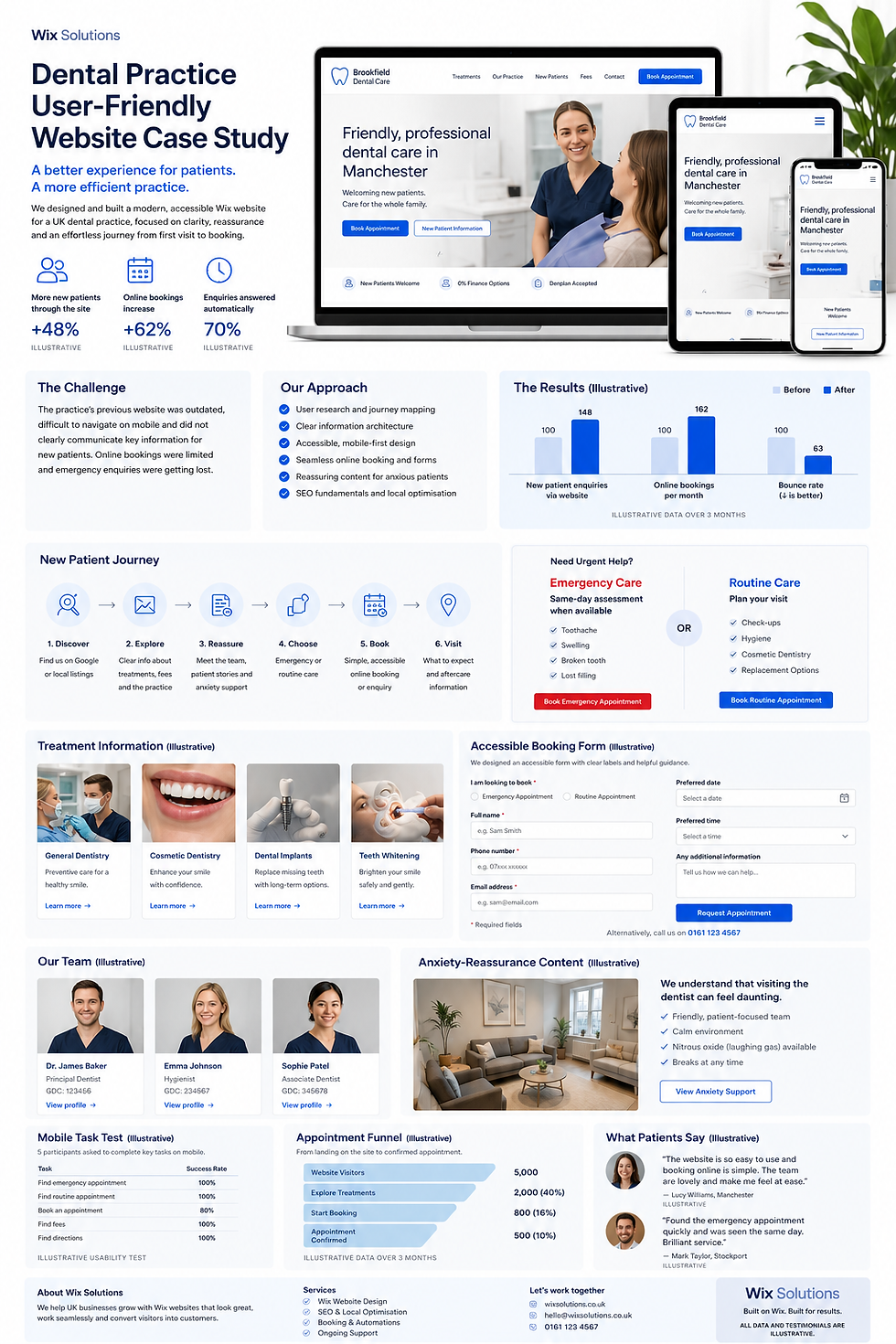
Case study 4: Dental practice — accessible forms and calm language
A dental practice used a small health-information tool to prepare patients for discussions about diet and oral health. User testing showed that dense labels and warning-heavy copy increased anxiety. The interface was rebuilt with short questions, visible help, a progress indicator and an option to continue without saving.
The same lesson applies to macro calculators. Explain why a field is needed, keep error messages specific and ensure keyboard and screen-reader access. If the user is outside scope, provide a respectful next step rather than a dead end. Accessible design improves safety because more people can understand what the tool is and is not doing.
Case study 5: Educational retailer — protect age boundaries
An educational retailer proposed a family nutrition feature alongside content for parents. The project team rejected the idea of applying the adult macro calculator to children. Instead, the adult tool was age-gated and the family section linked to appropriate NHS information without producing child-specific calorie or macro targets.
This boundary prevented a convenient feature from becoming an unsuitable one. It also illustrates a broader design principle: a calculator must refuse tasks its evidence and governance cannot support. More outputs do not make a tool more complete; clear limits do.

Design and build checklist for Wix
Put the purpose, adult-only scope and information-only notice before the first input.
Use correct input labels, units, validation, keyboard order and visible focus states.
Show the equation, assumptions, source date and rounding method beside the result.
Offer Reset and Change answers controls without requiring an account.
Process values locally where possible; avoid storing health-related information by default.
Keep the result readable on small screens and do not place essential explanations inside images.
Use neutral colours and language; avoid success animations tied to weight loss or extreme targets.
Add content-owner, professional-review and technical-review responsibilities to the update process.
Test edge cases, unit conversion, empty fields, unrealistic values and screen-reader announcements.
Review analytics at task level without recording sensitive inputs.
For wider usability principles, see Creating User-Friendly Websites for Better Engagement and Key Elements Every Successful Website Should Have. If the tool links to food products, the transaction journey should also follow Features Every E-commerce Site Should Have.
What the result page should contain
Your estimate: labelled clearly as a general estimate, with units and sensible rounding.
How it was calculated: formula, input summary, activity assumption and energy allocation.
Reference context: UK population guidance and the date the source was reviewed.
Balanced interpretation: protein, carbohydrate and fat shown together, not one nutrient in isolation.
Food-first examples: varied portions and dietary patterns without implying supplements are required.
Safety message: specific groups who should seek professional advice and links to appropriate support.
Privacy statement: whether inputs were stored, for how long and for what purpose.
Next actions: edit inputs, reset, read balanced-eating guidance or discuss the result with a registered professional.
Frequently asked questions
Is a protein and macro calculator medical advice?
No. It produces estimates from general reference values and the information entered. It cannot assess health history, medication, pregnancy, clinical conditions, nutrient deficiency or disordered eating. Users with medical or specialist needs should speak to a GP or registered dietitian.
Why can two macro calculators give different answers?
They may use different energy equations, activity factors, goal adjustments and protein or fat assumptions. Small differences can also come from rounding. A responsible tool explains its method and presents the result as an estimate rather than a precise prescription.
Should the calculator be used for children?
This article's proposed tool is for adults only. Children and teenagers have age- and development-specific requirements, and adult weight or activity formulas should not be applied to them. A separate professionally reviewed tool and safeguarding approach would be needed.
What information should a Wix calculator store?
Prefer processing the result in the browser without saving personal inputs. If storage is genuinely required, collect only what is necessary, explain the purpose and retention period, provide a privacy notice and protect access. Health-related information deserves particular care.
Conclusion
A complete protein and macro intake calculator is not the one with the most fields or the most confident number. It is the one that explains its method, uses credible reference material, protects users who fall outside scope, respects privacy and makes uncertainty visible.
Wix Solutions can design and build responsive Wix calculators with clear content models, accessible interactions, privacy-conscious data handling and an accountable review process. For health-related tools, professional nutrition review should be part of the project from discovery to publication.
Bibliography
Gandy, Joan, editor. Manual of Dietetic Practice. 6th edition.
Lanham-New, Susan A.; Hill, Thomas R.; Gallagher, Alison M.; Vorster, Hester H., editors. Introduction to Human Nutrition. 3rd edition.
Geissler, Catherine; Powers, Hilary, editors. Human Nutrition. 13th edition.
Burke, Louise; Deakin, Vicki; Minehan, Michelle, editors. Clinical Sports Nutrition. 6th edition.
Wendel, Stephen. Designing for Behavior Change: Applying Psychology and Behavioral Economics. 2nd edition.