
Why Professional Website Design Matters

A business website is not professional because it uses fashionable colours or expensive animation. It is professional when it helps the right audience understand the offer, trust the evidence and complete the next step without confusion. It must also be accessible, responsive, maintainable and connected to the way the organisation actually works.
That combination requires decisions across strategy, content, visual design, technology and governance. Wix Solutions treats the website as a business system: the pages customers see, the content staff maintain, the enquiries or transactions the site supports and the measurement used to improve it.
Professional website design connects business and customer needs
Professional website design begins with two perspectives. The business needs qualified enquiries, bookings, sales, applications or support outcomes. The visitor needs clear information, credible evidence, low-friction interaction and reassurance about what happens next. The design must connect the two.
A home page cannot carry the entire relationship. Service pages, product information, guidance, forms, policies and follow-up messages must all use a coherent structure and voice. When one part is weak, the journey feels less trustworthy even if the opening screen looks impressive.
For the visual foundations behind a coherent interface, read The Essentials of Effective Graphic Design.
1. Clear positioning and content architecture
Visitors should be able to recognise who the business serves, what it provides and where it operates. Clear positioning does not mean reducing a complex organisation to a slogan; it means organising detail so people can find the level they need.
Use customer language in menus and headings.
Give distinct services or products focused pages.
Connect evidence, FAQs and guidance to the relevant offer.
Show service areas accurately without inventing local premises.
Use internal links to reveal meaningful relationships.
Keep one primary action visible at the point a visitor is ready.
A professional information architecture also helps the team avoid duplicate content. Each page has an owner and purpose, while shared information is managed consistently.
2. Trust built from evidence
Professional design gives evidence the right prominence. Credentials, processes, specifications, prices, policies, team expertise, reviews and case studies can reduce uncertainty, but they must be accurate and appropriate to the sector.
Avoid invented testimonials, unverified badges and unsupported performance claims. Review time-sensitive content and state limitations clearly. In regulated services, the website should inform and route people safely rather than imitate professional advice.
3. A usable customer journey
Good user experience is the result of deliberate order. Visitors move from recognition to understanding, comparison, reassurance and action. The page should answer the next likely question without forcing everyone through the same amount of detail.
Use descriptive calls to action rather than vague labels.
Keep forms proportionate to the next business step.
Show prices, eligibility or service boundaries when they affect the decision.
Provide visible success, error and confirmation states.
Make phone, email, booking and location information easy to use on mobile.
Explain response times and what happens after an enquiry.
Our guide to Websites Design explains how structure, content and functionality work as one system.
4. Responsive design as a core requirement
A responsive website preserves hierarchy and task completion across screen sizes. It is not enough for content to fit inside a phone viewport. Navigation, forms, tables, filters, images and calls to action must remain understandable and operable.
Professional testing uses realistic content and multiple breakpoints. Long titles, missing CMS values and complex product or service names reveal layout problems that perfect placeholder copy conceals.
5. Accessibility and inclusive communication
Accessibility should be considered from the page plan onwards. Logical headings, readable contrast, keyboard navigation, visible focus states, form labels, alternative text and clear language support people with different abilities and contexts.
Accessible design is also better governance. Teams need rules for publishing images, documents, video captions and colour-coded information so new content does not undo the quality established at launch.
6. Performance and disciplined media
Large images, unnecessary video, excessive scripts and complex effects can make a polished design feel slow. Performance work begins with content and art direction: choose the right asset, display it at the required size and avoid loading media that adds little value.
Review templates, third-party integrations and unused code as the site evolves. Performance is not a one-time score; it is an ongoing publishing responsibility.
7. Search foundations designed into the site
Search visibility depends on useful content and a site that can be understood and accessed. Professional design supports this with descriptive URLs, page titles, logical headings, crawlable links, mobile usability, image alternatives and a coherent content structure.
Design cannot guarantee rankings, but poor structure can make good content harder to discover. Read
Website Design Impacts Search Rankings for the connection between experience and technical foundations.
8. Maintainable content and permissions
The website must remain accurate after handover. Reusable sections and CMS collections reduce repetition, while clear roles prevent every editor from changing structural settings. Content fields should match the way the business maintains information.
Name collections, fields, pages and reusable components clearly.
Define who creates, reviews, approves and archives content.
Record image licences, consent and source files.
Use review dates for prices, credentials, policies and regulated information.
Train editors on responsive and accessibility implications.
Maintain a version and redirect plan for significant changes.
9. Business functions that fit operations
Forms, bookings, e-commerce, events, automations and member areas are valuable when they support a real process. The website should not collect information the team cannot use or promise a response the business cannot deliver.
Map the route from submission to notification, ownership, response and reporting. Test integrations with real scenarios before launch and review access when staff responsibilities change.
10. Measurement and continuous improvement
Professional work defines what success means before building. Relevant measures might include qualified enquiries, completed bookings, product revenue, application completion, support deflection or content use. Traffic alone does not describe business value.
After launch, combine quantitative signals with customer questions, staff feedback and task testing. Improve the bottleneck in the journey rather than making cosmetic changes simply because a metric moved.
Template, custom design or phased approach?
A template can be a sensible starting point when the business model is straightforward and the chosen structure matches the content. Custom design is justified when the customer journey, brand system, content model or integration requirements are distinctive.
Many businesses benefit from a phased approach: establish a clear core website, validate the content and enquiry journey, then add advanced CMS relationships, automation or commerce. The right choice is the smallest coherent solution that the team can maintain.
What professional design should deliver
A documented audience and page strategy.
A coherent visual and content system.
Responsive page types and reusable patterns.
Accessible navigation, content and forms.
Appropriate CMS collections and business functions.
Essential SEO fields and redirect planning.
Analytics aligned with meaningful actions.
Quality assurance, handover and governance.
See how these deliverables come together in our guide to Wix website design.
Five illustrative professional website design case studies
These fictional examples show how professional requirements change by sector. All companies, people, testimonials, charts, figures and outcomes shown in the visuals are illustrative and are not claims about real Wix Solutions clients.
1. Commercial cleaning: from broad claims to qualified quotes
A commercial cleaning company serves offices, education, healthcare, retail and industrial clients. The redesigned structure separates services, sectors and genuine coverage areas so procurement visitors can identify fit quickly.
A mobile quote journey asks for service type, frequency, site size, postcode and preferred contact. Accreditation content has an owner and review date. Redirect planning protects useful URLs during the redesign, while local pages must contain distinct service information rather than duplicated place names.

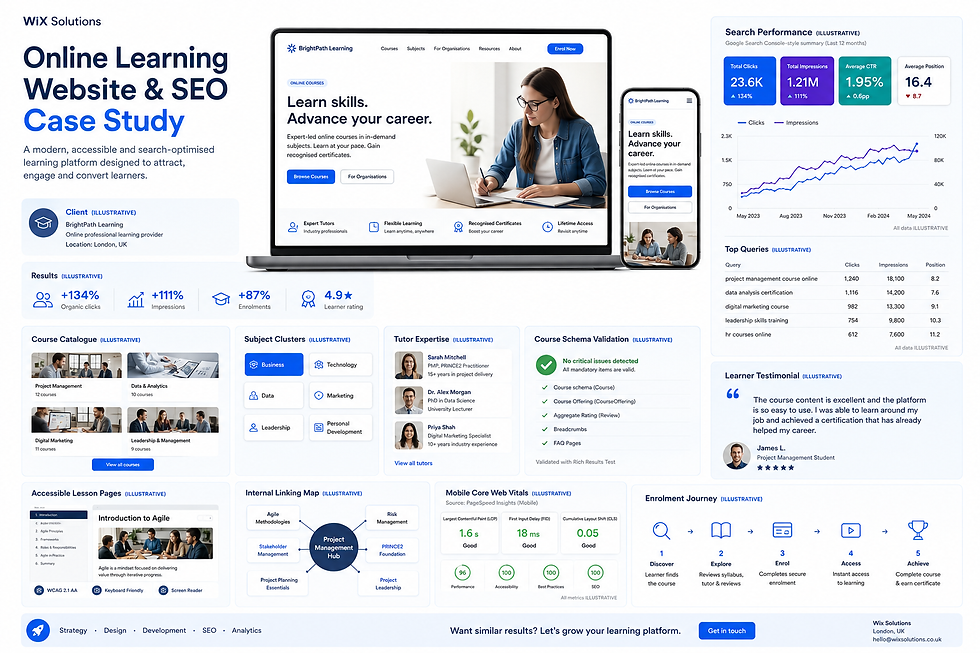
2. Online learning: structure for discovery and enrolment
An online learning provider needs course discovery, clear outcomes, tutor evidence and an accessible lesson experience. The design uses subject clusters and a CMS-backed course catalogue so courses, tutors and related resources remain consistent.
Internal links connect individual courses to broader learning hubs. Enrolment has a clear sequence from syllabus review to secure payment and access. Mobile testing prioritises course comparison and lesson readability, while structured course information is validated before release.
3. Community charity: inclusive routes to support and participation
A community charity serves people seeking help, volunteers, donors and local partners. The website cannot assume every visitor has the same reading level, language or digital confidence. Service finding, volunteering, donations, impact stories and events therefore use separate, clearly labelled journeys.
Easy-read content, language support, safeguarding information and privacy controls are visible parts of the experience. A CMS workflow separates draft, review, approval and scheduled publication so urgent content can be maintained without losing accountability.

4. Cybersecurity consultancy: demonstrate expertise without exposing risk
A cybersecurity consultancy needs to educate security-conscious buyers, show credible expertise and qualify enquiries. Sector and service architecture keeps technical detail findable, while a gated report workflow requests proportionate information before delivery.
Role-based permissions reflect content responsibility, and forms follow privacy-by-design principles. Trust evidence is specific and reviewable. Performance and mobile usability matter because the audience may access the site in controlled corporate environments.

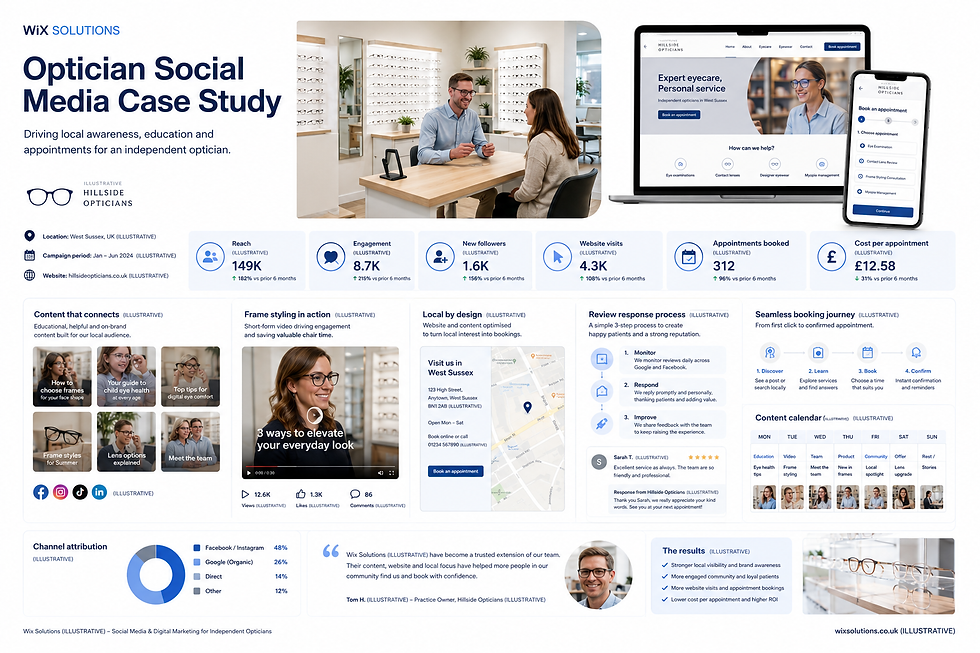
5. Independent optician: join education, local trust and booking
An optician website should help customers understand services, find the practice and book an appropriate appointment. Educational content supports common questions about eye examinations, lenses and frame choice without becoming individual clinical advice.
The mobile booking journey begins with appointment type and explains the next step. Local information is consistent, review responses follow an agreed process and social content connects back to useful website pages rather than operating as a separate channel.
What the case studies reveal
Professional design is contextual. A cleaning company needs service qualification; a learning platform needs structured courses; a charity needs inclusive access; a cybersecurity consultancy needs trust and permissions; an optician needs safe information and booking.
The common foundation is a clear architecture, responsive and accessible interaction, governed content and a measured operational journey. Wix Solutions brings those layers together rather than treating the website as a set of isolated pages.
Frequently asked questions
Is professional website design only about appearance?
No. Appearance is one layer. Professional design also includes strategy, content architecture, responsive behaviour, accessibility, performance, business functions, SEO foundations, measurement and maintainability.
Can a template produce a professional website?
Yes, when the template fits the content and customer journey, is adapted carefully and receives the same quality assurance as a custom build. A mismatched template can create more work than it saves.
How much should a professional website cost?
Cost depends on page types, content readiness, CMS complexity, integrations, e-commerce, accessibility work and testing. Request an itemised scope, assumptions and post-launch responsibilities rather than comparing one headline figure.
How often should a business website be reviewed?
Operational details and critical forms should be checked regularly. A broader monthly or quarterly review can examine performance, search visibility, accessibility, customer questions and content accuracy. Regulated or time-sensitive information may need a stricter schedule.
Conclusion
Professional website design matters because a website represents both the customer experience and the business process behind it. Clarity, evidence, accessibility and maintainability are more valuable than effects that cannot survive real content or daily use.
Wix Solutions designs websites as joined-up systems: strategy, visual identity, content, Wix functionality, quality assurance and governance. That approach gives business owners a credible platform they can operate and improve.
Bibliography
Krug, Steve. Don’t Make Me Think, Revisited: A Common Sense Approach to Web Usability, 3rd edition.
Garrett, Jesse James. The Elements of User Experience: User-Centered Design for the Web and Beyond, 2nd edition.
Tidwell, Jenifer; Brewer, Charles; Valencia, Aynne. Designing Interfaces: Patterns for Effective Interaction Design, 3rd edition.
Wheeler, Alina. Designing Brand Identity: An Essential Guide for the Whole Branding Team, 5th edition.
Halvorson, Kristina; Rach, Melissa. Content Strategy for the Web, 2nd edition.


