

Hair Salon Website Design: A Practical Guide for Modern Salons

Updated: Nov 23, 2024
Hair salon website design works best when visual identity and practical customer tasks support one another. A salon may have distinctive branding and excellent photography, but visitors still need to understand services, prices or consultation requirements, find the right booking route, check the location and decide whether the salon feels suitable. Design should make those decisions easier rather than asking customers to work through decorative effects before they can find essential information.
A modern salon website also needs to be maintainable. Services change, stylists join or leave, prices are reviewed, galleries grow and booking rules evolve. Wix Solutions approaches a salon website as a working business system: clear information architecture, mobile-friendly service journeys, authentic visual evidence, reliable booking links and an update process that the team can realistically manage.
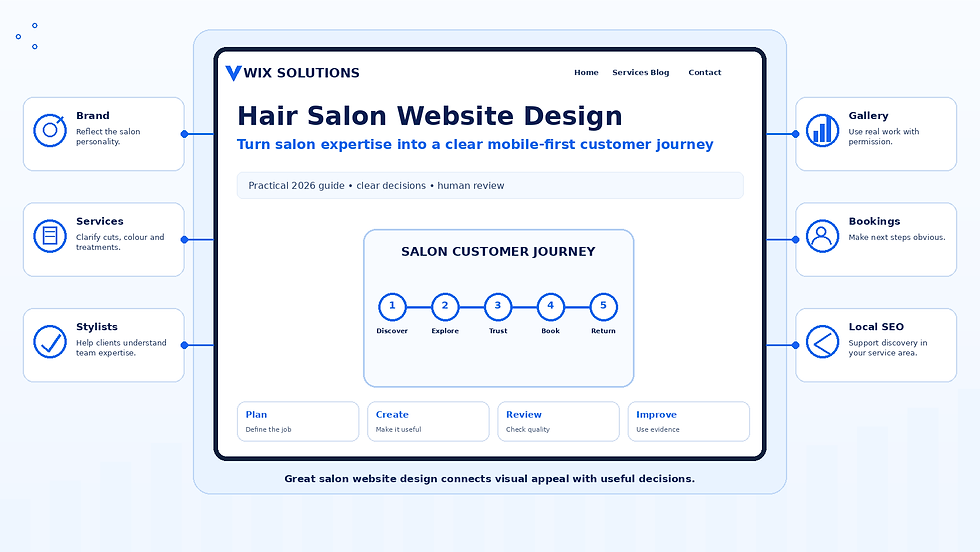
What a hair salon website needs to do well
Start with the client journey rather than a list of fashionable features. A new visitor may need to compare services, understand which stylist or appointment type is appropriate and see examples of relevant work. A returning customer may want the fastest possible route to rebook. Someone considering a major colour change may need consultation information before they can select an appointment. The website should support these different needs without making navigation complicated.
The principles in Target Audience Profiling can help a salon identify genuine information differences between first-time, repeat and specialist-service customers. The objective is not to create stereotypes; it is to understand which questions change the page structure or next step.
Hair salon website navigation should reflect client language
Use navigation labels customers recognise. Depending on the salon, useful destinations may include Services, Prices, Stylists, Gallery, Reviews, About, Contact and Book. Large service menus can be grouped into meaningful categories such as Cutting, Colour, Styling or Treatments, with the wording matched to the real booking system. Avoid internal service codes or terminology that clients are unlikely to understand.
Structure service pages around booking decisions
A service page should give enough information for the next decision. Explain what is included, approximate duration where useful, pricing approach, consultation requirements, preparation or aftercare, who the service is designed for and how to book. If prices vary by hair length, stylist level or complexity, explain the system rather than hiding all variation behind a generic “from” price with no context.
For services that depend on consultation, patch testing or other professional requirements, the digital journey should reflect the real salon process. The website should not imply that every treatment can be booked immediately if the business needs an assessment first. Clear pre-booking information can reduce confusion without making medical or performance claims the salon cannot support.
Make mobile booking simple and consistent
Many customers reach salon websites on a phone from search, maps, social media or a message. Test the booking journey on a real mobile screen. Check service menus, buttons, calendar steps, forms, sticky elements and confirmation information. A prominent Book button is useful only when the person can still understand which service they should choose.
If the salon uses Wix Bookings or another scheduling tool, align the public website with the booking catalogue. Service names, stylist choices, durations, locations and consultation routes should use consistent language. When a booking system contains operational detail that would overwhelm the main site, the service page can explain the decision in plain English and then send the customer to the correct booking option.
Use a portfolio as evidence of real work
Hair is a visual service, so a well-curated portfolio can be one of the most useful parts of the website. Use genuine salon work where permission is available and organise it so visitors can understand what they are seeing. A gallery can be grouped by colour, cuts, occasion styling or another structure relevant to the salon. Captions can identify the type of work without making unsupported claims about results.
Do not present stock or generated images as if they show actual clients or stylist work. Before-and-after photography requires consistent framing, honest representation and appropriate consent. Compress images, review crops on mobile and write concise alt text when the photograph communicates information that matters to the page.
Present stylists and salon identity clearly
A team page can help customers choose confidently when stylist experience or specialisms matter. Use current photographs and factual profiles rather than generic biographies. Explain relevant skills, service areas and booking information without turning every profile into a long sales pitch. If a stylist leaves, update their page, booking links and references promptly so the website does not send customers towards an unavailable option.
Build trust with authentic reviews and practical details
Trust is built through consistent business information as well as strong imagery. Keep address, opening information, contact routes, policies and booking expectations accurate. Use genuine customer feedback only where it can be represented responsibly. The guide to customer testimonials explains how to position verified feedback without inventing names, ratings or outcomes.
Support local search without duplicating location pages
A hair salon website should clearly identify its real location and the services available there. Use consistent business details, helpful directions and naturally written service content. Local SEO is not achieved by repeating a town name through every heading. Search visibility depends on the wider quality of the website, relevant content, technical accessibility and consistent local business information.
For a salon with several branches, each location page should contain genuine branch-specific information such as address, access, stylists, services, opening times or the correct booking route. Avoid producing near-identical pages that only replace the location name.
Four practical hair salon website examples
Example 1: an independent salon with a small team
An independent salon has three stylists and a focused service menu. The website can use a simple structure: home, services and prices, team, gallery, reviews, contact and booking. Each stylist profile highlights relevant services, while the booking system presents the same names customers have already seen on the website. The owner can maintain the site without a complex editorial workflow.
Example 2: a colour specialist using consultations
A colour specialist does not want first-time clients booking complex appointments without consultation. The service page explains the consultation process, what information the salon needs and which services can be booked directly. Portfolio examples are organised around relevant colour work, and the main call to action for new complex-colour clients is consultation rather than an unsuitable appointment slot.
Example 3: a busy salon with many services and stylist levels
A larger salon offers cutting, styling, colour and treatments with several stylist levels. Instead of placing every combination in one long page, the site introduces service categories and explains how pricing levels work. Detailed choices remain in booking, but the public pages give enough context for a customer to understand the structure before opening the calendar.
Example 4: a salon redesign preserving an established client journey
An established salon redesigns a dated website while keeping a booking process repeat clients already know. The redesign improves mobile navigation, image quality, accessibility, service explanations and local information but keeps familiar service names and stable booking links. The goal is a better experience without creating unnecessary relearning for existing customers.
How AI tools can support hair salon website design
AI tools can accelerate planning when they work from approved salon information. They can organise a service list into draft page groups, cluster common enquiry questions, suggest FAQ categories, produce first-pass heading options, draft alt-text candidates from verified image descriptions and adapt approved website copy into initial email or social versions. AI can also help compare the public website with a current service list to flag wording that may need review.
AI cannot replace salon knowledge, consent or visual proof
AI may invent prices, service inclusions, product claims, stylist qualifications or expected results. Generated hairstyle images can also look plausible while depicting work no stylist actually performed. They should not be used as fake portfolio evidence or client results. People who understand the salon must review service details, professional requirements, policies, consent, accessibility, imagery and final claims before publication.
Connect the website with the wider salon content system
The Beauty Salon Website Template guide provides broader treatment-business design principles, while the Spa Website Template article focuses on spa and wellness customer journeys. Use these resources to keep related topics distinct rather than repeating nearly identical advice across several pages.
When the salon promotes guides, portfolios or offers through email and social media, Channel Optimisation Planning can help define which information belongs on the permanent website and how shorter channel versions should direct customers back to a maintained source.
Review performance and maintain the site after launch
Check whether visitors can understand services, reach the correct booking route, view portfolio work comfortably and find local information on mobile. The framework in Content Performance Analysis can help connect analytics with the job each page was created to do. Traffic alone does not prove that the salon website is useful.
Assign responsibility for service updates, prices, team profiles, opening information, galleries, policies and booking links. Remove outdated stylist references promptly and review major service pages when the salon changes its offer or booking process. A good website remains current because maintenance is part of the design, not an emergency task added years later.
Design the salon website around clarity and authentic evidence
Strong hair salon website design combines recognisable branding with clear service information, comfortable mobile use, appropriate booking paths, authentic portfolio work, verified customer feedback and accurate local information. Interactive features can be useful when they solve a real customer problem, but they should not be added simply because a template or trend makes them possible.
Wix Solutions can support salon businesses with website structure, design, content and digital customer journeys. No feature or design style guarantees appointments or search rankings; long-term value comes from accurate information, tested functionality, credible visual proof and consistent maintenance.


